
Optimization / Rust
Rust Notes: GPUI Shell Brings JavaScript Plugins to Native Apps, and a Token-Bucket Rate Limiter From Scratch
The first post in our new Rust section. GPUI Shell lets native Rust apps load sandboxed JavaScript plugins without a browser engine, and publishes what that costs. And a clear tutorial builds a token-bucket rate limiter from scratch, with a testable clock and refill arithmetic that never loses time.
 Akmal Alif · 11 October 2026 MYT
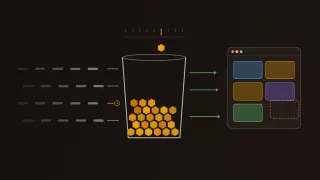
This is the first post in our new Rust section, under Optimization. It collects Rust work that makes software faster, smaller or safer, from new frameworks to well-built learning projects. This first edition covers two things from the past few weeks. GPUI Shell lets a native Rust app load plugins written in JavaScript without a browser engine. And a clear tutorial builds a token-bucket rate limiter, one of the most useful small algorithms in backend engineering, from scratch.
Part 1: GPUI Shell, JavaScript plugins without a browser
On 27 August 2026 Jason Lee (@huacnlee), the Longbridge engineer behind most of the GPUI Kit code, announced that GPUI Shell had been merged and documented. The post listed its selling points: plugins written in JavaScript, about 13.5 MiB added to the binary and 14 MiB of memory, zero capabilities by default for security, hot reload and a 120 frames-per-second target. The demo video in the post was written entirely in JavaScript (Lee, 2026).
Some background: GPUI and GPUI Kit
GPUI is the GPU-accelerated UI framework that Zed Industries built in Rust for the Zed code editor. Longbridge, a brokerage, builds a component library on top of it, used in its own desktop trading apps. The library was called GPUI Component and has since been renamed GPUI Kit, with its documentation now at gpui-kit.com (Longbridge, n.d.-a). Both GPUI and GPUI Kit are in our Tools Gallery.
What GPUI Shell is
GPUI Shell makes a Rust GPUI application extensible in JavaScript (Longbridge, n.d.-b). Its main goal is plugins: the host app ships once, and new panels and features arrive later as scripts loaded into the same process, with no rebuild and no fork. Its second use is writing whole small apps in JavaScript with the Shell command-line tool, which is also how plugins are developed.
The documentation is just as clear about what it is not. It is not Electron or Tauri: there is no WebView, no DOM, no HTML or CSS, no browser engine and no Node.js. Instead it embeds QuickJS, a small JavaScript engine, through the rquickjs crate, running on the host's own thread.
How it stays fast
The design keeps JavaScript out of the hot path:
A plugin's render function describes the interface with builder calls, which Shell records into a compact arena instead of creating objects for each element.
Rust replays that description into real GPUI elements.
Layout, painting, text input and editing all happen in Rust and never call back into JavaScript.
Render runs only when a view is invalidated, not on every frame, and unchanged frames reuse a cached snapshot.
On a 443-element benchmark, the documentation measures about 1.1 ms of JavaScript rendering plus 1.3 ms of Rust rendering per frame, and 1.3 ms for a cached frame (Longbridge, n.d.-b).
The numbers, read carefully
Size. The runtime adds about 13.5 MiB to the binary and 14 MiB of memory. The documentation stresses that this is a fixed cost, not one that grows with the app. An example host measures 26.1 MiB on disk and 81 MiB resident on an M3 MacBook Pro.
Frame rate. The 120 FPS figure in the announcement is a target, not a guarantee. The documentation reports a live Longbridge market-terminal workload against that target, which reached 69 frames per second. That is honest reporting worth crediting, and a reminder to check performance claims against the measurement behind them.
Security: nothing until it is granted
A plugin starts with no capabilities at all: no file access, storage, clipboard, processes or network (Longbridge, n.d.-c). The host app grants what a plugin may use, the plugin's manifest declares what it asks for, and a view's grant is fixed once it loads. The sandbox goes further:
eval and every way of building functions from strings are removed;
built-in prototypes are frozen, so a script cannot tamper with shared objects;
imports are confined to the plugin's own directory;
each plugin has a 256 MiB heap and a 1 MiB stack, and each call has a time limit (50 ms during render, 500 ms in event handlers and tasks), which a script cannot catch and ignore.
Developer experience and status
Running Shell with watch mode reloads a plugin whenever its files change. If the new code fails, the old version keeps running and an error notice appears, so a typo does not take down the app. The tooling can also generate TypeScript types for the component library.
GPUI Shell is labelled a preview. It is not yet published to crates.io, its API is expected to change, and plugin hosting inside existing apps is only partly finished. What works end to end today is the standalone path, where a whole app is written in JavaScript (Longbridge, n.d.-b).
Why it matters for optimization. The usual way to make a desktop app scriptable is to embed a browser, which costs hundreds of megabytes and a second rendering stack. GPUI Shell shows a lighter path: a small interpreter that only describes the interface, with Rust doing the expensive work. Whether it holds up at scale is still an open question, but the trade-off is laid out with real numbers.
Part 2: A token-bucket rate limiter in Rust
The second item is a tutorial: "Build an In-Memory Token-Bucket Rate Limiter in Rust - Structs and Methods", by Sahil, who writes as Sheerluck. It is part four of a Learning Rust series and teaches structs and methods by building something genuinely useful (Sahil, 2026).
What a token bucket does
A rate limiter decides whether a request may go ahead. A token bucket is the classic way to do it, and it is easy to picture:
The bucket holds a fixed number of tokens and starts full.
Every request spends one token.
Every time a fixed interval passes, one token is added back, but never above the capacity.
When the bucket is empty, the request is refused and told how long to wait.
The capacity sets how big a burst can be. The interval sets the long-run rate. That combination, short bursts allowed and a steady average enforced, is why token buckets protect so many APIs.
The design
The tutorial deliberately leaves out networking, threads and sleeping, so the logic stays in plain view. It uses three structs:
Struct | Holds | Notes |
|---|---|---|
RateLimitConfig | the capacity and the refill interval | Its constructor returns an error for a zero capacity or a zero interval, so an invalid limiter cannot exist. |
TokenBucket | the config, the tokens available and the time of the last refill | Starts full. |
Decision | whether the request is allowed, the tokens remaining and, if refused, how long to wait | The answer each request gets back. |
Apart from its constructor, the bucket has one public method, try_acquire. It first refills any tokens that are due, then either spends a token or refuses. When it refuses, the wait it reports is the time left until the next whole interval.
The refill step, carefully
The refill is where rate limiters usually go wrong, and the tutorial handles three subtle cases:
Time spent full earns nothing. If the bucket is already full, the last-refill time simply moves to now. Otherwise a client could sit idle and bank time towards future tokens.
Clocks that go backwards give zero. Elapsed time is computed with saturating subtraction, so an earlier timestamp produces zero rather than an error.
Partial intervals are kept, not lost. The bucket adds one token per whole interval elapsed, then moves the last-refill time forward by exactly that many intervals, not to now. The leftover fraction carries into the next request.
The tutorial's example makes the third point concrete: with a 2-second interval, after 5 seconds the bucket gets 2 tokens back, and the extra second counts towards the next one. Rounding that second away would make the limiter slowly stingier than its configuration.
A clock you can control
Every method takes the current time as an argument instead of reading the system clock. That one decision makes the code fully testable. The tests and the demo program pass in synthetic times, such as the start plus five seconds, so nothing sleeps and every run gives the same result. The six tests cover an invalid configuration, the initial burst, keeping partial time, a long idle period never exceeding capacity, time spent full earning nothing, and a timestamp from the past.
What it teaches about Rust
Along the way the tutorial covers structs with named fields and tuple structs, field init shorthand, struct update syntax, deriving Debug, impl blocks and the three kinds of self receiver, associated functions, privacy for encapsulation, Result and a first look at Option, Duration and Instant, organising a crate with a library and a binary, and unit tests. It also encourages breaking the code on purpose and reading what the compiler says. The next part in the series moves on to enums and pattern matching.
What the two have in common
Both projects are about spending a budget carefully. GPUI Shell spends a fixed 13.5 MiB and a few milliseconds per frame to buy scripting, and publishes the measurements. The token bucket spends tokens to keep a service inside its rate, and gets the arithmetic exactly right. In both, the optimization comes from measuring and accounting precisely, not from cleverness.
References
Lee, J. [@huacnlee]. (2026, August 27). GPUI Shell has been merged and the documentation is online [Post]. X. https://x.com/huacnlee/status/2092900552967602629
Longbridge. (n.d.-a). GPUI Kit [Computer software]. GitHub. Retrieved October 11, 2026, from https://github.com/longbridge/gpui-kit
Longbridge. (n.d.-b). GPUI Shell. GPUI Kit documentation. Retrieved October 11, 2026, from https://gpui-kit.com/shell/
Longbridge. (n.d.-c). Capabilities. GPUI Shell documentation. Retrieved October 11, 2026, from https://gpui-kit.com/shell/capabilities
Sahil. (2026, October 7). Build an in-memory token-bucket rate limiter in Rust: Structs and methods. Sheerluck's Digital Garden. https://notes.sheerluck.dev/articles/rust/build-an-in-memory-token-bucket-rate-limiter-in-rust---structs-and-methods