
Computer Use / Video Editing
Video Editing by Prompt: How Nate Herk Edits with Opus 5.5, HyperFrames and Agent Skills
Nate Herk edits video by prompt with Claude Opus 5.5, HeyGen's open-source HyperFrames renderer and reusable agent skills. The six edits, the five steps behind them, why treating video as code works, and what the video leaves out on cost, rights and judgement.
 Akmal Alif · 11 October 2026 MYT
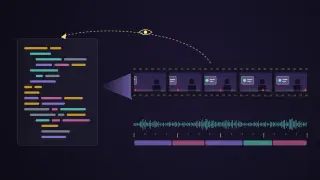
On 25 September 2026 Nate Herk, who runs the YouTube channel Nate Herk | AI Automation, published a 19-minute video with a big title: "Opus 5.5 Just Changed Video Editing Forever". In it, Herk shows six edits made by Claude Opus 5.5 inside Claude Code: a channel intro, two showreels, an event sizzle reel, one cooking clip edited three ways and a spec ad for a sportswear brand. Herk then lists the five habits behind them (Herk, 2026a).
The interesting part is not the claim of taste. It is how the edits are made. Nothing in the video drags clips around a timeline. The model writes web pages, a renderer turns them into frames, and the model checks its own output by looking at those frames. This post explains that pipeline from the video and from the two open-source projects it relies on, with timestamps that jump to each part. It is paraphrased from the video's English auto-generated captions.
The stack: an agent, a renderer and some skills
Three pieces do the work.
Claude Code running Opus 5.5. Herk ran almost every example at the high effort level (watch from 13:32).
HyperFrames, the renderer. HyperFrames is an open-source framework from HeyGen, released under the Apache 2.0 licence, whose tagline is "Write HTML. Render video. Built for agents." A video is an HTML page: each element carries data attributes for when it starts, how long it lasts and which track it sits on, and animations come from GSAP, CSS or similar libraries. The renderer seeks to each frame in headless Chrome and encodes the result with FFmpeg, "so the same input produces the same video" (HeyGen, 2026). Herk's setup advice is simply to give Claude Code the repository link and ask it to install HyperFrames (watch from 1:01).
Skills. Agent skills are folders of instructions and scripts that Claude Code loads when a task needs them. HyperFrames ships its own set, which teach an agent to plan a video, write valid compositions, lint, preview and render. Herk adds a free HyperFrames Student Kit with his own skills, such as cut-silences, cut-mistakes, video-storytelling, motion-showreel and short-form-edit, plus 406 draft motion-graphics cards (Herk, 2026b).
The video points viewers to Herk's community site for the kit, but the same kit is public on GitHub under the MIT licence. The licence excludes the AI Automation Society brand assets used in its examples, which stay the property of that company.
Two outside services fill gaps: ElevenLabs' Scribe for transcription, which is paid per use, and Kie.ai for generated images and video. Local Whisper is a free, slower alternative for transcripts, and the generated assets are optional (Herk, 2026b; watch from 2:01).
The six edits
1. The intro, from one prompt
Herk gave Claude the raw intro clip and one prompt (watch from 0:48):
Transcribe the video first, so animations land at the right moment.
When Herk names two other strong models, Fable 5.1 and GPT-6 Astra, and points, animate the Claude and OpenAI logos where he points, each on a "liquid glass" card so it stays readable.
Highlight "best outputs ever" in the lower third.
While Herk talks about B-roll, screenshots and generated media, bring in real examples on either side of the frame, to prove the model can fetch them.
The model did all of this and added touches Herk had not asked for: a slow push-in at the start, a mock chat interface when he says "one prompt", and an animation about verification (watch from 3:31). Herk calls it taste. Mechanically, these are choices a model makes when a prompt leaves room, which Herk later says you can switch off by listing exactly the beats you want.
2. A YouTube showreel, from a reference video
For the second edit Herk started from someone else's work (watch from 4:20):
He downloaded a showreel he liked, posted on X and also made with HyperFrames and Opus.
He asked Claude Code to analyse why it worked, then to turn that analysis into a skill, which became motion-showreel.
He ran the skill on a new brief: a showreel that feels unmistakably like YouTube.
The kit's README describes the result: 15 seconds at 1920×1080 and 60 frames per second, cut to a 129-beats-per-minute grid, with a red scrubber dot that travels through seven chapters and lands as the play button (Herk, 2026b). Along the way the model generated still images and sent them to a video model to animate, then composited the clips (watch from 6:30).
3 and 4. A one-prompt showreel and an event sizzle reel
The third edit used a prompt Herk found on X: make a dynamic 15-second motion-graphics showreel for his company, using real assets and logos where possible (watch from 6:58). The model pulled pictures from the company's website and worked in how many members the community has.
The fourth is Herk's favourite benchmark: point Claude Code at a 105 GB folder of recordings from a live event and ask for a sizzle reel that tells a story (watch from 8:40). This one took three prompts: the brief, one round of feedback and one fix. Herk is candid about its flaws, including some awkward cuts mid-sentence (watch from 10:00).
5. One clip, three styles
Herk filmed himself explaining avocado toast and asked for three edits (watch from 10:40):
Whiteboard: simple hand-drawn animation, as if explaining to a child, with some scenes as a full whiteboard and others split between the drawing and his face.
Course style: the camera starts full screen and shrinks to a rounded crop, beside large bullet points and simple AI-generated images.
Short form: fast-paced, with generated B-roll behind every line.
Each was one prompt. Herk's critique of the whiteboard version is a useful reminder of what still needs a human: the eggs are drawn too small, and the balsamic glaze covers only one piece of toast.
6. A spec ad
The last example is an unsolicited ad for a sportswear brand (watch from 14:53). Herk believes the model found real products on the brand's website and generated clips of a person wearing them, then mixed those with catalogue images. Herk's own input was the brief and the feeling: high energy, fast-paced, cut to the music.
Herk's five steps
Herk sums up the method in five steps (watch from 16:12):
Transcribe. A word-level transcript lets the model place every beat at the right time and find the story in the footage.
Cut. Have the model remove mistakes and dead air it finds in the transcript, which is far faster than scrubbing for them by hand.
Plan the beats. The more precisely you say what should appear and when, the closer the output matches your intent.
Build skills. When you like something, turn it into a skill. After each run, tell the model what worked and what did not, and have it update the skill. Anything you find yourself repeating belongs in a skill.
Verify. Herk calls this the most important step. The agent renders a draft, takes screenshots, looks at them, fixes what is wrong and repeats, so the first version you see is already its fifth or sixth (watch from 18:00).
Why this works: video as code
The method only works because every step is something a coding agent is already good at.
The edit is source code. Language models have read a vast amount of HTML, CSS and JavaScript. A composition is a web page with timing attributes, so changing a font, a colour or a beat is a text edit rather than a drag on a timeline. Anthropic's own Claude Motion, covered in our post on Claude Dashboards, Claude Motion and moats, takes the same approach: animation written as code, not generated footage.
The cuts are data. Once the transcript has word-level timings, removing a stumble means deleting a time range and letting FFmpeg render the cut.
The render is deterministic. HyperFrames seeks each frame and encodes it, so a frame the agent checks in preview matches the frame in the final file. The model is the unpredictable part; the pipeline around it is not. Our post on whether LLMs are deterministic explains why that split matters.
Verification uses vision. The agent looks at rendered frames as images and judges them, the same skill that computer-use agents rely on to read a screen. Here the agent drives a renderer, a shell and web APIs rather than a mouse, but closing the loop by looking at its own output is what moves it from writing code to editing video.
What the video does not show
Cost. High-effort Opus runs, transcription minutes and generated images and clips all cost money or usage. The video does not put a number on any of it.
Rights. Several examples use real logos, product photos and a brand's identity. That is fine for a personal experiment, but publishing a spec ad or a branded reel raises trademark and licensing questions, and the kit's own licence excludes the brand assets in its examples.
Generated people. By Herk's account, the sportswear ad includes generated clips of a person wearing real products. Viewers deserve to know when footage is synthetic.
Judgement. The kit's verification notes call it "a working toolkit, not a promise of fully automatic editorial judgment", and its 406 cards are drafts that need testing (Herk, 2026c). Herk's own critiques, the awkward cuts and the tiny eggs, are the same point in practice.
Promotion. The video description includes affiliate and sponsor links, and the skills are promoted through Herk's community site. The GitHub repository is the direct route.
How to try it
Install Node.js 22 or newer, FFmpeg with ffprobe, Git and Chrome or Chromium, which both projects require.
Install the HyperFrames skills into your agent with the command in the HyperFrames README, or ask Claude Code to set it up from the repository link, as Herk does.
Clone the Student Kit and run its setup and tests, then render the eight-second demo before touching your own footage.
Start with a single operation, such as cutting silences from one recording, and review the proposed cuts before anything is rendered.
Turn every correction you make twice into a skill.
Video editing used to be the slow part of publishing a video. In Herk's workflow it becomes a review job, which still needs someone who knows what good looks like.
References
HeyGen. (2026). HyperFrames [Computer software]. GitHub. Retrieved October 11, 2026, from https://github.com/heygen-com/hyperframes
Herk, N. [Nate Herk | AI Automation]. (2026a, September 25). Opus 5.5 just changed video editing forever (free skills) [Video]. YouTube. https://www.youtube.com/watch?v=7jHXoPGnA4c
Herk, N. (2026b). HyperFrames Student Kit [Computer software]. GitHub. Retrieved October 11, 2026, from https://github.com/nateherkai/hyperframes-student-kit
Herk, N. (2026c). Release verification. HyperFrames Student Kit. GitHub. Retrieved October 11, 2026, from https://github.com/nateherkai/hyperframes-student-kit/blob/main/docs/VERIFICATION.md