
Optimization / WebGL
Dither Page Transitions in WebGL: How Sora UI's 1-Bit Curtain Works, and What to Check Before Copying It
Sora UI's docs use a 1-bit Bayer dither curtain between pages, built with raw WebGL instead of Three.js. How the shader decides each pixel, why it covers the live page instead of crossfading, how it waits out slow networks, and five details to check before copying it.
 Akmal Alif · 11 October 2026 MYT
The WebGL corner of EXEPERT's Optimization section is for graphics that look expensive and are not: effects that run on the GPU in a few lines of shader code instead of a heavy library. A good first example is a page transition that the Sora UI team wrote up in September 2026.
When a visitor moves between pages of Sora UI's documentation, a black, pixelated curtain sweeps across the screen in a pattern of tiny checkerboard dots, the page changes behind it, and the curtain dissolves away again. The effect is a 1-bit ordered dither, the look of early Macintosh graphics and of Lucas Pope's game Return of the Obra Dinn. The write-up, by Axyl of Sora UI, explains how it was built without Three.js and how it copes with slow networks (Axyl, 2026). Sora UI credits the visual direction to 2xa.studio, and the code is open source.
This post explains how the effect works, why it costs so little, and a few places where the article's claims and the shipped code differ, as read on 11 October 2026.
Why not Three.js
The article's opening argument is about proportion. Three.js is a full 3D engine of around 650 KB minified, and a screen wipe is a flat 2D effect. Sora UI instead calls WebGL 1.0 directly: one canvas, one tiny vertex buffer and one fragment shader, which the article puts at about 3 KB of code (Axyl, 2026).
The geometry is the smallest thing WebGL can draw that covers the screen: two triangles forming one rectangle. The vertex shader passes the corners straight through with no camera or matrices, so all the interesting work happens per pixel in the fragment shader.
The shader, step by step
For every pixel on the screen, every frame of the transition, the fragment shader answers one question: should this pixel be black, or see-through? It gets there in three steps (SoraLabsOSS, n.d.).
An organic edge. A 2D simplex noise function adds a soft, cloud-like wobble, so the curtain's leading edge is ragged instead of a straight line. A random offset is chosen on every show and hide, so no two wipes look the same.
A moving threshold. A single number, progress, runs from 0 to 1 over the animation. Combined with a vertical gradient and the noise, it gives each pixel a "fill" value: how covered that spot should be right now. A direction setting flips whether the curtain travels down or up.
An ordered dither. The fill value is compared against a threshold taken from an 8 by 8 Bayer matrix. If the fill is higher, the pixel is opaque black; if not, it is transparent. There are no greys: the in-between is expressed as patterns of dots.
What a Bayer matrix does
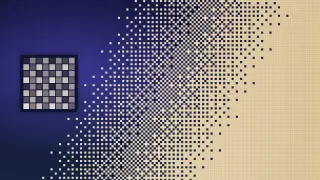
Ordered dithering tiles a fixed grid of thresholds across the image and compares each pixel against the threshold in its cell (Wikipedia contributors, 2026). The Bayer matrix orders those thresholds so that, as a value rises from dark to light, dots switch on in an evenly spread sequence. That produces the characteristic crosshatch patterns seen in the cover image. Sora UI's shader computes the 8 by 8 matrix with arithmetic, building it up from a 2 by 2 pattern, instead of reading it from a texture, and scales it with a dither-size setting of 3 device pixels per cell.
Lucas Pope's development log for Return of the Obra Dinn is the classic deep dive on 1-bit dithering. The game used an 8 by 8 Bayer matrix on some objects for a smoother range of shades and a blue-noise pattern elsewhere, and the log explains how a dither pattern fixed to the screen appears to "swim" when the camera moves (Pope, 2017). A page wipe has no moving camera and lasts about a second, so the simpler screen-fixed Bayer pattern works well here.
Cover and reveal, not crossfade
The most useful design decision is what the effect does not do. It never takes a snapshot of the old page or renders anything to a texture. WebGL cannot draw web page content directly, and capturing the page as an image would be slow and memory-hungry. Instead, the shader draws an overlay on top of the live page. The overlay closes, the route changes underneath it while the screen is covered, and the overlay opens again (SoraLabsOSS, n.d.).
Surviving slow networks
The article's second theme is timing. A naive transition shows the curtain, starts navigation, waits a fixed time and hides the curtain. On a slow connection the curtain lifts before the new page has arrived, and the visitor sees a white flash or the old page (Axyl, 2026).
Sora UI's transition, as shipped for the documentation, waits for evidence instead of a timer:
The curtain closes over 1.1 seconds while a terminal-style text animation types in.
After a 200-millisecond hold, navigation starts inside a React transition.
The code waits until at least 500 milliseconds have passed and the route has actually changed and finished loading. A 30-second safety timeout falls back to a full page load.
It waits two animation frames, so the browser has painted the new page under the overlay.
The curtain lifts over 1.7 seconds.
GSAP drives the tween and the frame loop, and the loop runs only while a transition is in progress, so the GPU is idle while the visitor reads. The canvas resolution is capped at twice the CSS pixel size on high-density screens (SoraLabsOSS, n.d.).
Why it is cheap on the GPU
Each pixel does a little noise maths, a few comparisons and one write. There are no textures to sample, no draw calls beyond one rectangle, and no work at all between transitions. Effects like this are a good fit for the GPU precisely because every pixel can be computed independently and in parallel.
What to check before copying it
The article is a good guide, and the code is worth reading. A few claims are worth checking before reusing them, based on the source code and MDN's WebGL guidance as of 11 October 2026:
Frame rate. The title promises 60 frames per second and the body a locked 120. A page can only render as fast as the display refreshes, so 120 applies on 120 Hz screens.
Memory. The article cites 48 bytes of video memory. That is the vertex buffer: twelve numbers. The canvas's drawing buffer is far larger. A full-screen 1920 by 1080 viewport at the capped pixel ratio of 2 is 3,840 by 2,160 pixels at 4 bytes each, about 33 MB, before any double-buffering.
Cleanup. The article says the WebGL context is released when the component unmounts. In the current source, the cleanup function deletes the buffer and program but does not call the lose-context extension, which MDN recommends doing eagerly (MDN, n.d.).
Precision. The fragment shader always asks for high-precision floats. MDN notes that high precision in fragment shaders is optional in WebGL 1, so some older mobile GPUs may refuse to compile it (MDN, n.d.). A fallback to medium precision would better support the article's point about running on old phones.
Dependencies. "Zero dependencies" applies to the graphics. The timing relies on GSAP, and the reduced-motion check comes from the Motion library.
None of these change the core idea. They are the kind of details that matter when an effect moves from a demo into a product.
Accessibility
The implementation respects the operating system's reduced-motion setting thoroughly: if it is on, the canvas is never created, no shader is compiled, and navigation is instant. The overlay is hidden from assistive technology when idle and blocks clicks during a transition, and a second click mid-transition is ignored (SoraLabsOSS, n.d.).
For everyone else, each documentation navigation now involves around three seconds of full-screen motion. That is a deliberate design choice, but it is worth weighing against the guidance on animation triggered by interaction in the Web Content Accessibility Guidelines (W3C, 2023), and worth checking that keyboard focus and screen-reader announcements still behave well when a transition sits between every click and the next page.
The recipe in brief
Draw one full-screen rectangle with raw WebGL; skip the 3D engine.
In the fragment shader, combine a progress value, a little noise and a Bayer threshold into one opaque-or-transparent decision per pixel.
Cover the live page, change the route underneath, wait for the real route change and two frames, then reveal.
Run the render loop only during transitions, cap the pixel ratio, release the context when done, and skip the whole thing for visitors who ask for reduced motion.
References
Axyl. (2026, September 7). Building a 60fps WebGL dither page transition: Ditching Three.js and surviving slow networks. Sora UI. https://ui.soralabs.studio/blog/dither-page-transition-webgl
MDN. (n.d.). WebGL best practices. Mozilla. Retrieved October 11, 2026, from https://developer.mozilla.org/en-US/docs/Web/API/WebGL_API/WebGL_best_practices
Pope, L. (2017, November 23). Return of the Obra Dinn (devlog reply 786) [Online forum post]. TIGSource Forums. https://forums.tigsource.com/index.php?topic=40832.msg1363742#msg1363742
SoraLabsOSS. (n.d.). ui: page-transition components [Computer software]. GitHub. Retrieved October 11, 2026, from https://github.com/SoraLabsOSS/ui/tree/main/apps/www/components/page-transition
W3C. (2023). Understanding success criterion 2.3.3: Animation from interactions. Web Content Accessibility Guidelines 2.2. https://www.w3.org/WAI/WCAG22/Understanding/animation-from-interactions.html
Wikipedia contributors. (2026). Ordered dithering. Wikipedia. Retrieved October 11, 2026, from https://en.wikipedia.org/wiki/Ordered_dithering